How to enable SPI on the BeagleY-AI
Hardware and Software Requirements
- BeagleY-AI (AM67A) development board
- BeagleY-AI Kernel Source
- Host machine running Linux
This article documents how to enable hardware SPI on the BeagleY-AI.
By default, the board ships with a bit-banged SPI implementation, and
the spidev device is not exposed under
/dev/spidevX.Y, preventing user-space applications from
accessing the SPI controller.
Considering how new the BeagleY-AI platform is, documentation is still limited. During research, the following references were particularly helpful:
Kernel and Boot Context
- Host OS: Debian 6.1.158-1 (x86_64)
- Target kernel:
6.1.83-ti-arm64-r72+ - Kernel built from source and deployed to SD card
- Custom DTBO compiled and passed to the kernel
- Boot configuration handled via
extlinux.conf
Clone DTS File from Source
Clone the repository containing the DTS file required to enable SPI:
cd ~git clone https://github.com/wcs3/BYAI-mcu_spi0.gitcd BYAI-mcu_spi0
Compile DTS File to DTBO
NB: Ensure the following include paths are available to the device tree compiler:
arch/arm64/boot/dtsarch/arm64/boot/dts/ti
Once inside the kernel source tree, compile the DTBO using:
-
cpp -nostdinc -I include -I arch/arm64/boot/dts \
-I arch/arm64/boot/dts/ti -undef -x assembler-with-cpp \
arch/arm64/boot/dts/ti/k3-am67a-beagley-ai-spidev0-mcu.dts |
dtc -@ -I dts -O dtb -o k3-am67a-beagley-ai-spidev0-mcu.dtbo
If successful, the output file
k3-am67a-beagley-ai-spidev0-mcu.dtbo
will be generated and ready for deployment.
Deploy to the Board
Copy the compiled DTBO to the SD card and update the boot configuration:
cp k3-am67a-beagley-ai-spidev0-mcu.dtbo /media/user/BOOT/overlayssyncls /media/user/BOOT/overlaysnano /media/user/BOOT/extlinux/extlinux.conf-
Add:
fdtoverlays /overlays/k3-am67a-beagley-ai-spidev0-mcu.dtbounder the default boot entry sudo umount /media/user/BOOTsudo umount /media/user/rootfs
Test the Driver
After reinserting the SD card and booting the BeagleY-AI, observe the UART console for SPI initialization messages.
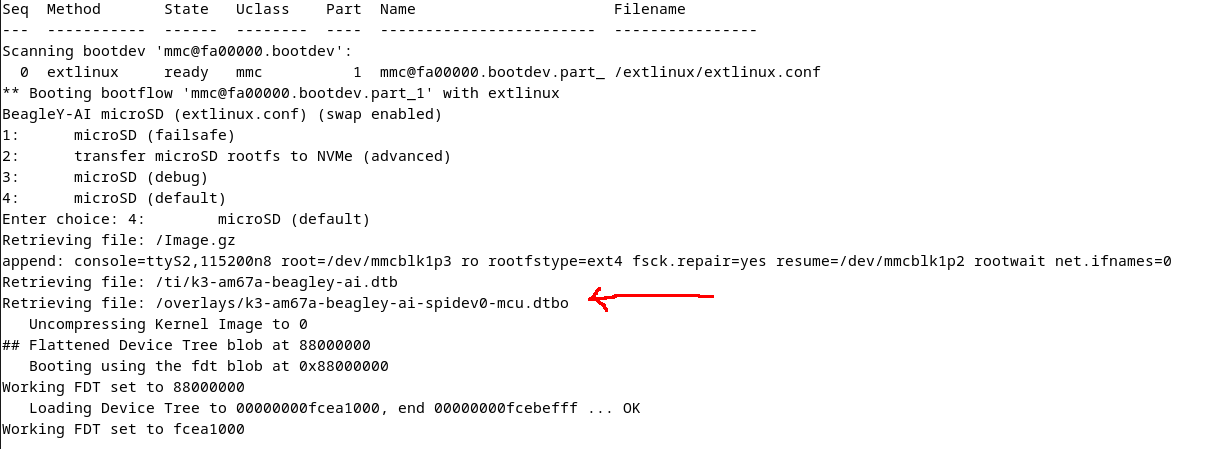
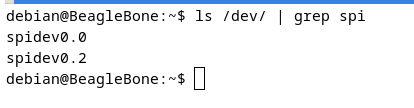
Once the system has booted, verify that the SPI device node is present:
This article is shared freely to assist others working with the BeagleY-AI platform.